
What's Cookin' At Atomic Grease!?
I’m not gonna’ lie. I had no idea what to do with Atomic Grease when I first thought of it. Ohhh, I can start another business where I sell my art and all that good stuff! Nope. It started while mixing a song. The ‘pop’ I needed just wasn’t there and anytime I compared it to songs I liked, similar in sound, it just sounded flat and really quiet by comparison. I bought plugins, spent hours tweaking EQs, did everything I could and still… everything else just sounded better.
So I decided to do what I do best: build something.
PUNKMASTER
I basically live in VS Code, VS Studio, and a number of compilers. And that’s really where Atomic Grease came to be. I already liked the name, made logos, and thought I had a vision on what it could be. It wasn’t until I ran into a problem I’ve had for years—mastering loud ass punk music. Yeah, I tried everything. But for some reason actually building a VST to my liking never crossed my mind… until now. So, double-boom! Off I went to create a VST specifically for loud ass punk rock ‘n’ roll. The birth of PUNKMASTER!

I’m pretty darn proud of this especially seeing it in action inside Fender Studio Pro. Right now I’m only doing PC builds; iOS and Linux are on the radar. So if your DAW runs on PC and accepts VST3 tech (most do these days), go ahead and download PUNKMASTER for free from the home page. Pop it in and listen to that loud ass sound!
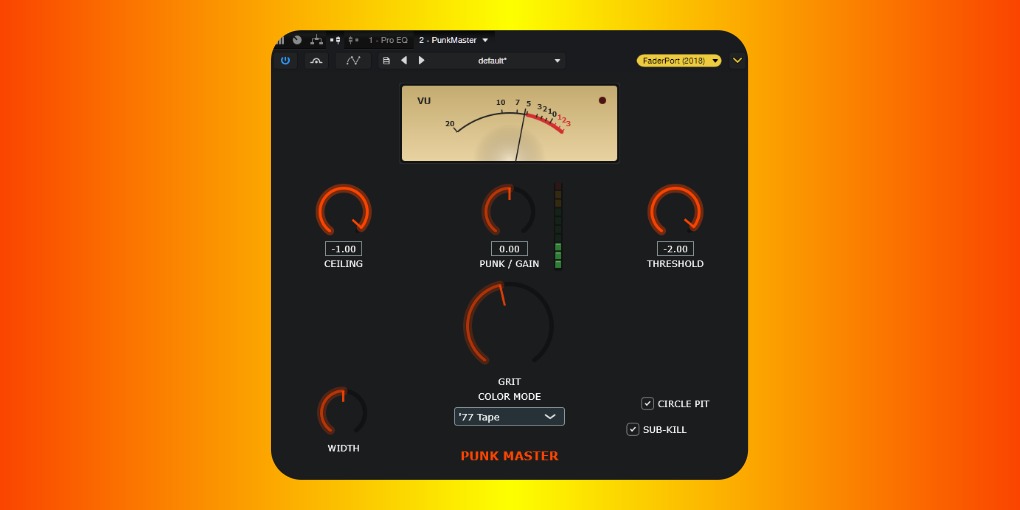
Installation instructions (Windows only):
- UNZIP and save the root folder to C:\Program Files\Common Files\VST3
- Open your DAW's Effects Panel
- If you don't see PunkMaster, make sure your DAW fetches from the file path
- Drag/Drop to the end of your Master Bus' chain - Boom!
- Customize your sound (Note: ceiling can be set to 0.0 for extra loudness)
Have fun! If you get stuck, remember to read the guide or join us on Threads to ask questions.